Waiting for your TV to activate can be frustrating, especially when you have entered an activation code correctly, but nothing seems to happen. Fortunately, most TV and streaming app activation processes are relatively quick.
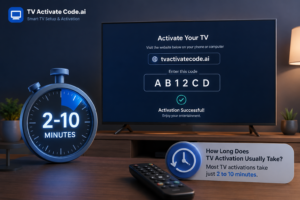
In many cases, TV activation takes only a few seconds to a few minutes. However, the exact time depends on the TV, streaming device, app, internet connection, and account being used. A short delay is usually normal, but a longer delay may indicate a problem that needs troubleshooting.
How Long Does TV Activation Usually Take?
For most streaming apps and compatible devices, the actual activation process is completed shortly after a valid code is entered.
A typical activation process involves:
- Opening the streaming app on your TV.
- Selecting Sign In, Activate, or a similar option.
- Waiting for the TV to display an activation code.
- Opening the service’s official activation page on a phone or computer.
- Signing in to the correct account.
- Entering the code displayed on the TV.
- Waiting for the TV to connect to the account.
If your internet connection is stable and the service is operating normally, the confirmation may appear almost immediately.
However, the overall setup can take longer if the television needs a software update, the network connection is unstable, or the service requires additional account verification.
What Happens During TV Activation?
Understanding the activation process can make troubleshooting easier.
When you enter an activation code, the service checks whether the code is valid and then connects your TV or streaming device with your account. Once the request is approved, the service sends confirmation back to the TV.
This means the TV is not working alone during activation. Several components are involved, including your device, internet connection, account, application, and the service’s online systems.
A problem with any one of these can make activation appear stuck.
Why Is My TV Activation Taking So Long?
Several common issues can cause a delay.
Unstable Internet Connection
Your TV needs a working internet connection to communicate with the activation service. Weak Wi-Fi or temporary network interruptions can prevent the activation confirmation from reaching the device.
Try opening another app on the TV. If other online services are also slow or unavailable, check your network connection before continuing with activation.
Expired Activation Code
Activation codes are often temporary. If you leave the activation screen open for too long, the code may expire.
Instead of repeatedly entering the old code, return to the application and generate a new one.
Incorrect Code
Activation codes commonly contain a combination of letters and numbers, which makes them easy to mistype.
Compare the code on the TV with the code entered on your phone or computer. If a new code is available, use the newest one.
Account Problems
Activation may fail if you are signed into the wrong account or if the required subscription is inactive.
Check that you are using the correct account credentials and that the service is available with your current plan.
App or TV Software Issues
An outdated application or TV operating system can sometimes interfere with activation.
Check whether your TV or streaming app has an available update. If an update is already being installed, allow it to finish before trying activation again.
Temporary Service Problems
Sometimes the problem has nothing to do with your TV.
The streaming service may be experiencing maintenance, an outage, or temporary server problems. In these situations, activation can fail even when everything on your device is configured correctly.
What to Do If TV Activation Is Stuck
If your TV activate process is taking longer than expected, work through the following steps.
- Check the internet connection.
Confirm that the TV is connected to Wi-Fi or Ethernet. Test another online app to make sure the connection is working. - Generate a new activation code.
If the current code has been displayed for several minutes, return to the activation screen and request another code. - Verify your account.
Make sure you are using the correct account and that your subscription or service is active when required. - Restart the app.
Close the streaming application completely, reopen it, and start the activation process again. - Restart the TV.
Turn the television off, wait a short time, and turn it back on. Then reopen the app and try again. - Restart the router if needed.
If several devices are experiencing internet problems, restarting the router may restore a stable connection.
These basic steps resolve many temporary activation problems without requiring a factory reset.
When Should You Stop Waiting?
You normally should not need to wait for a long period after submitting a valid activation code.
If the TV has not responded after several minutes, or the same activation attempt repeatedly fails, it is better to troubleshoot the problem rather than continuing to wait.
Pay particular attention to error messages such as “invalid code,” “activation failed,” “service unavailable,” or “device not supported.” These messages can provide a clue about whether the issue involves the code, account, device, or service.
Common Activation Mistakes to Avoid
Many users encounter problems because of simple setup mistakes.
Avoid:
- Using an old activation code.
- Entering the code incorrectly.
- Signing into the wrong account.
- Attempting activation while the TV is offline.
- Ignoring pending software updates.
- Repeatedly submitting a failed code.
- Using an unofficial activation website.
- Factory-resetting the TV before trying basic troubleshooting.
When looking for TV activate help, always confirm that you are following instructions from a legitimate source and using the official activation page provided by the relevant service.
Final Takeaway
Most TV activation processes are completed within seconds or a few minutes when the device, account, network, and activation service are working normally.
If activation is taking longer, start with the simplest possibilities: check your internet connection, generate a fresh code, verify your account, restart the app, and restart the TV.
A delay does not automatically mean that your television is faulty. In many cases, the problem is a temporary connection, expired code, account issue, or service-side problem. If basic troubleshooting does not resolve it, the official support channel for your specific device or streaming service is the safest next step.
If you are looking for practical TV activation help, Tv Activate Code provides easy-to-follow educational guides covering activation, setup, configuration, and common troubleshooting issues.
Disclaimer
TV Activate Code.ai is an independent help website that provides setup and troubleshooting guides. We are not affiliated with, endorsed by, or sponsored by any brand, service, or device manufacturer mentioned in this article.